
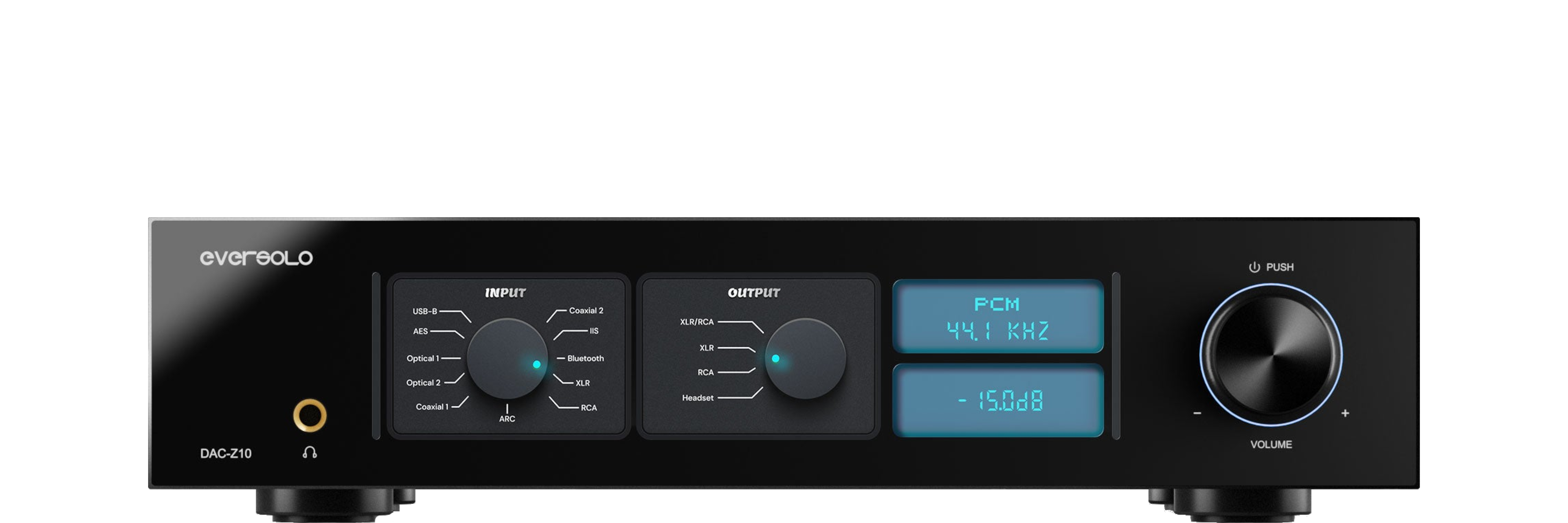
Eversolo DAC-Z10 Firmware Update & Restoration Guide
- Initial hardware driver integration
Implemented full driver support for the dual AK4191 + AK4499EX DAC architecture. - Optimized OCXO Clock sync
Enhanced the stability of the Oven Controlled Crystal Oscillator (OCXO) during the initial 5-minute warm-up period. - Enabled R2R Volume Relay Logic
Initial programming for the relay-based R2R volume control to ensure clicking synchronization across both channels. - Added IIS (I2S) Compatibility modes
Added the 8-mode switching logic to the IIS input to ensure compatibility with different transport pin definitions (e.g., Gustard, PS Audio standards). - 8.8″ Display UI Calibration
Optimized the resolution scaling for the main interface and added the first three “Classic” VU meter styles. - Bluetooth Protocol support
Enabled Qualcomm QCC5125 support for aptX HD and LDAC receiving. - Fixed SPDIF “Pop” sound
Resolved a minor DC offset pop that occurred when switching between Coaxial and Optical inputs.
Version
v1.0.1.26
Build Date
2025-10-30
MD5
checksum file*

Official Download

Alternative Download

- Initial system release and optimization
Established core system stability for the DAC-Z10 hardware platform. - Enabled R2R Precise Volume Control
Initial implementation of the dual-channel R2R resistor array volume management, ensuring signal purity across all levels. - Support for Dual AK4191 + AK4499 Architecture
Optimized the signal path for the independent left and right channel DAC modules. - Added OCXO Clock management
Implemented firmware-level synchronization for the Temperature-Controlled Crystal Oscillators to minimize jitter. - Expanded Audio Input Support
Enabled full support for IIS (8 mode configurations), AES/EBU, Optical, Coaxial, and ARC inputs. - VU Meter and UI Implementation
Added the initial suite of personalized VU meters and spectrum displays for the 8.8-inch IPS screen. - Trigger Linkage Support
Enabled the 12V Trigger input/output functionality for synchronized power control with external amplifiers. - App Control Integration
Enabled initial compatibility with the Eversolo Control App (iOS/Android) for remote management.
Version
v1.0.1.38
Build Date
2026-01-21
MD5
checksum file*
Official Download
Alternative Download
- Added automatic volume reset when headphone is unplugged
When the headphone is unplugged, the headphone output volume will return to the default value. - Added input source editing
Allows customization (display/hide) of the device input sources. - Minimum output volume set to -70dB
The output volume can now be set as low as -70dB. - Added default boot volume options: -40dB and -50dB
Default boot volume can be set to either -40dB or -50dB. - Added volume passthrough switch
Supports enabling or disabling the volume passthrough function (fixing volume at 0dB for external preamps). - Added volume limit function
Allows limiting the maximum volume to prevent excessively loud output. - Optimized TRIGGER linkage when screen is off
The device will now correctly link TRIGGER to power off when the screen is off. - Optimized quick power on/off
Fixed occasional no-sound issue during rapid power on/off sequences.
Version
v1.0.1.40
Build Date
2026-01-26
MD5
checksum file*
Official Download
Alternative Download
- Fixed an issue where the device could unexpectedly reboot when connected to the Control App.
Specifically addresses the crash that occurred when navigating to the “Settings” menu within the mobile app. - Added automatic volume reset when headphone is unplugged.
Volume returns to default value to prevent speaker blasts. - Added input source editing.
Allows customization (display/hide/rename) of device input sources. - Minimum output volume set to -70dB.
- Added default boot volume options: -40dB and -50dB.
- Added volume passthrough switch.
Supports fixing volume at 0dB for external preamps. - Added volume limit function.
- Optimized TRIGGER linkage when screen is off.
- Optimized quick power on/off.
Fixed occasional “no-sound” issue during rapid power cycling.
Version
v1.0.1.42
Build Date
2026-02-02
MD5
checksum file*
Official Download
Alternative Download
- Added automatic volume reset when headphone is unplugged
When the headphone is unplugged, the headphone output volume will return to the default value. - Added input source editing
Allows customization of the device input sources. - Minimum output volume set to -70dB
The output volume can now be set as low as -70dB. - Added default boot volume options: -40dB and -50dB
Default boot volume can be set to either -40dB or -50dB. - Added volume passthrough switch
Supports enabling or disabling the volume passthrough function. - Added volume limit function
Allows limiting the maximum volume to prevent excessively loud output. - Optimized TRIGGER linkage when screen is off
The device will now correctly link TRIGGER to power off when the screen is off. - Optimized quick power on/off
Fixed occasional no-sound issue during rapid power on/off.
Extra:
- Fixed the issue of occasional automatic restart of the device
- Optimized the input source editing function
Version
v1.0.1.45
Build Date
2026-02-05
MD5
checksum file*
Official Download
Alternative Download